Complete Guide: How to Permanently Disable Windows Defender
Master the art of Windows Defender management with this comprehensive step-by-step guide. Learn advanced techniques, troubleshoot common issues, and optimize your system's security posture.
The ultimate free, open-source tool to disable, enable, and manage Microsoft Defender antivirus on Windows 10/11. Solve antivirus conflicts, improve system performance, and take full control of your Windows security.
Full disable/enable control over Windows Defender services
Eliminate resource usage and speed up file operations
Free, transparent, and community-driven software
Compatible with:
Defender Control offers comprehensive Windows Defender management with advanced features that other tools simply cannot match. Here's what makes it the best choice for power users.
Permanently disable or enable all Microsoft Defender services including real-time protection, cloud protection, automatic sample submission, and behavior monitoring.
Eliminate Windows Defender's resource usage and dramatically improve system performance. Experience faster file copying, reduced CPU usage, and improved gaming performance.
Seamlessly manage multiple antivirus solutions. Defender Control prevents conflicts between Windows Defender and third-party antivirus software like Avast, Kaspersky, and Norton.
Advanced bypass technology for Windows 11's Tamper Protection. Gain full administrative control over Defender settings that Microsoft tries to lock down.
Completely open-source on GitHub. Review the code, verify security, and contribute improvements. No hidden backdoors or suspicious activities - complete transparency.
Supports 25+ languages including English, Spanish, French, German, Italian, Turkish, Arabic, Chinese, Japanese, Korean, Russian, and many more for global accessibility.
Fine-tune every aspect of Windows Defender. Control scheduled scans, exclusion lists, reporting settings, and integration with Windows Security Center.
One-click restore functionality. Easily re-enable Defender if needed, with automatic system recovery and settings restoration to ensure Windows stability.
Intelligent system integration that works with Windows Updates, Group Policy, and enterprise environments. Perfect for IT administrators and power users.
x64 & x86 Support
~500KB Portable
March 2022
MIT License
Real experiences from users worldwide who have successfully managed their Windows Defender with Defender Control. Join thousands of satisfied users.
Software Developer
"Finally, a tool that actually works! I've tried countless Defender disablers, but Defender Control is the only one that completely disables Windows Defender on Windows 11. My gaming performance improved by 40% and file copying is lightning fast now."
IT Administrator
"As an IT admin managing 200+ workstations, Defender Control has been a lifesaver. It allows me to disable Defender on systems running third-party AV without conflicts. The open-source nature gives me confidence in its security. Highly recommended for enterprise use."
Gamer & Content Creator
"Windows Defender was killing my gaming performance. Constant background scans, high CPU usage, and random stutters during gameplay. Defender Control solved everything! My FPS increased by 25%, and the system feels much more responsive. Best investment for gamers."
Software Engineer
"The code quality is excellent. Being open-source, I can see exactly what it's doing. No shady processes or registry hacks. It cleanly disables Defender services and provides easy restoration. Perfect for development environments where you need full control over security settings."
System Administrator
"In our organization, we needed to disable Defender on specific machines running custom security software. Defender Control made this process painless. The multi-language support is a plus, and the fact that it's portable means we can deploy it easily across our network."
Video Editor
"Video editing requires massive file transfers and rendering power. Windows Defender was constantly interfering with my workflow, causing slowdowns and false positives. Defender Control eliminated all these issues. My rendering times improved by 30%, and I haven't had a single interruption since."
Would recommend to others
Report successful Defender disabling
Notice performance improvements
Comprehensive troubleshooting guide for Defender Control. Find solutions to the most common problems users encounter when managing Windows Defender.
Error messages appear when trying to disable Windows Defender
Windows Defender automatically re-enables after system reboot
Issues when running Defender Control alongside other antivirus software
File copying, moving, or scanning operations are extremely slow
Windows 11 Tamper Protection prevents Defender modifications
Always run Defender Control with administrator privileges
Turn off Windows Security Tamper Protection before using Defender Control
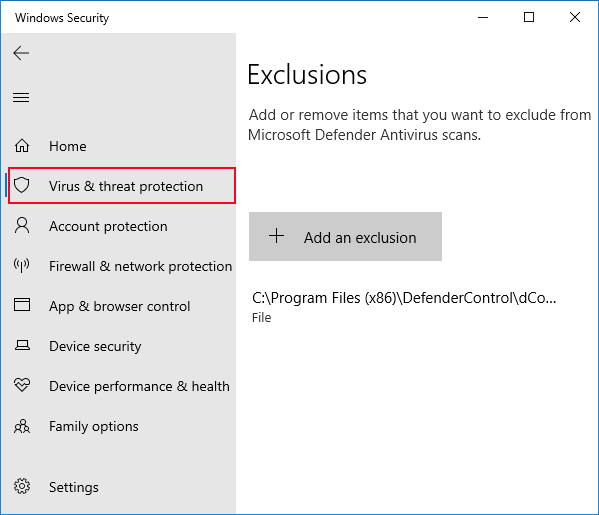
Exclude Defender Control from Windows Defender scanning
Temporarily disable other antivirus programs
Always restart after making Defender changes
Ensure you have write access to Defender registry keys
HKLM\SOFTWARE\Microsoft\Windows Defender
Verify Windows Defender services are not locked by other processes
Ensure you're running a supported Windows version
Check if Group Policy is enforcing Defender settings
Get the latest version of Defender Control from trusted sources. Free download with no registration required.
Download the original portable executable straight from Sordum. No bundled installers, no telemetry, and digitally signed binaries for peace of mind.
Package Size
~500 KB
Build Version
v2.1 Stable
Official Source
Verified clean archive delivered over SSL with zero third-party ads.
Download NowFormat
ZIP Archive
Signature
Publisher Signed
Last Update
March 2022
Status
Malware Scan Clean
Direct download • No ads • Virus-free
Download the ZIP file from any trusted source above. Extract to a folder you have write permissions to (avoid Program Files for easier access).
Right-click on dControl.exe and select
"Run as administrator". This is crucial for the tool to work properly.
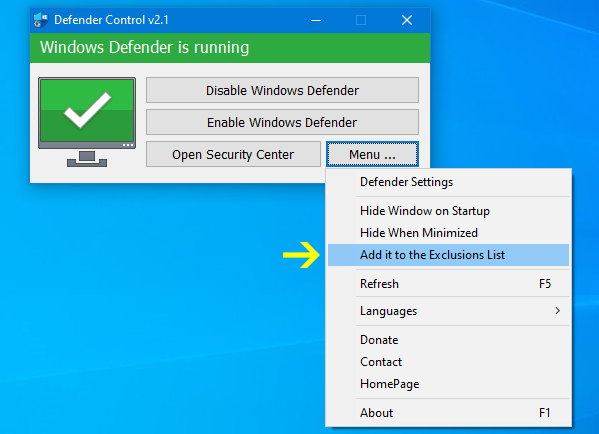
Click the "Add it to the exclusion list" button in Defender Control. This prevents false positives and ensures smooth operation.
For Windows 11 users: Go to Windows Security → Virus & threat protection → Manage settings → Turn off Tamper Protection.
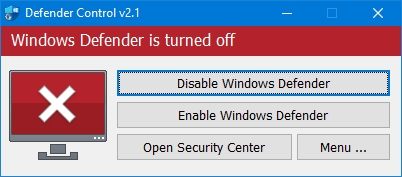
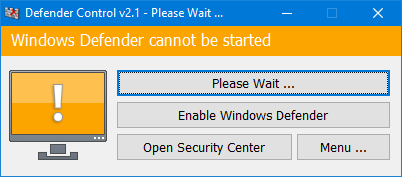
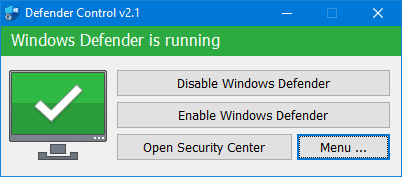
The main interface shows Defender status with color indicators: Green = Running, Red = Disabled, Orange = Partially disabled.
Click the "Disable Defender" button. The tool will automatically stop all Defender services and modify necessary registry keys and group policies.
Wait for the status indicator to turn red and show "Defender is disabled". This process takes 10-30 seconds depending on your system.
Important: Restart your computer to fully apply the changes. Defender will remain disabled after reboot.
To restore Defender, run the tool again and click "Enable Defender". The tool provides one-click restoration of all original settings.
Answers to the most common questions about Defender Control, Windows Defender management, and system performance optimization.
Yes, Defender Control is completely safe. It's an open-source project hosted on GitHub with transparent code that anyone can review. The tool only modifies Windows Defender settings and doesn't contain any malware, spyware, or unwanted software. It's been used by thousands of users worldwide without any reported security incidents.
Verification: Source code available on GitHub • No malware detected by VirusTotal • MIT License • Community reviewed
Defender Control supports all modern Windows versions including Windows 11, Windows 10 (version 1903 and later), Windows 8.1, and Windows 7 SP1. The tool automatically detects your Windows version and applies the appropriate settings and registry modifications.
Re-enabling Defender is just as easy as disabling it. Simply run Defender Control again with administrator privileges and click the "Enable Defender" button. The tool will automatically restore all original settings, restart necessary services, and re-enable Windows Defender protection.
While Defender Control disables Windows Defender, it's strongly recommended to use alternative antivirus protection. Windows Defender provides essential real-time protection against malware, viruses, and other threats. Consider reputable alternatives like:
Free, feature-rich antivirus
Excellent malware removal
Lightweight, effective protection
Disabling Windows Defender with Defender Control can significantly improve system performance, especially on lower-end hardware. Users typically experience 10-30% performance improvements in CPU usage, memory consumption, and file operation speeds.
Windows 11's Tamper Protection is Microsoft's enhanced security feature that prevents unauthorized changes to Windows Defender settings. Defender Control includes advanced bypass techniques that work with most Windows 11 installations, but some heavily customized or enterprise-managed systems may require manual intervention.
Comprehensive guides, tutorials, and insights about Windows Defender management, system optimization, and cybersecurity best practices.
Master the art of Windows Defender management with this comprehensive step-by-step guide. Learn advanced techniques, troubleshoot common issues, and optimize your system's security posture.
Encountering issues with Defender Control? This comprehensive troubleshooting guide covers all known problems and provides step-by-step solutions for successful Windows Defender management.
Compare Defender Control with other popular Windows Defender management tools. Detailed analysis of features, performance, security, and user experience to help you choose the right solution.
Detailed benchmarks and real-world testing showing the actual performance improvements when disabling Windows Defender. CPU usage, memory consumption, and application performance metrics.
Navigate the complexities of Windows 11's enhanced security features. Learn how to work with Tamper Protection, Secure Boot, and other Windows 11 security mechanisms while managing Defender.
Comprehensive guide for IT administrators managing Windows Defender across enterprise environments. Group Policy integration, centralized management, and compliance considerations.